Custom Bubble Bottle Labels for Kids' Parties and Events
The Design-First Approach to Event Branding
When you're planning a kids' party or a community event, the details matter. A simple bottle of bubbles becomes a memorable keepsake when it's wrapped in a thoughtfully designed label. This is where the Bubble Bottle Label Canva Template steps in, offering a practical and stylish solution for anyone looking to add a personalized touch without spending hours on complex design software. It’s not about having professional design skills; it's about having access to smart, ready-to-use tools that make the process straightforward and even enjoyable.
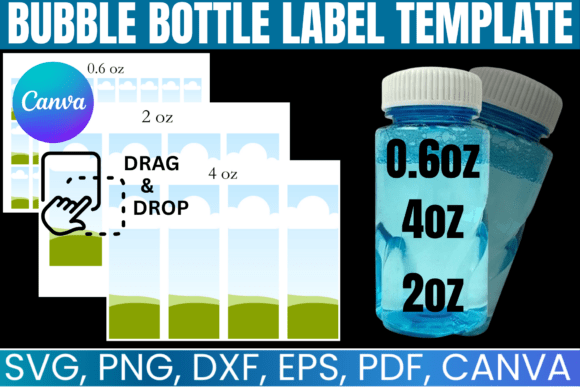
Imagine you're setting up for a birthday party. You have a dozen small bubble bottles, and you want them to match the theme—maybe a superhero motif or a pastel garden party. Instead of starting from scratch, you open the Canva link provided with the template. Within minutes, you can drag and drop your chosen colors, add the child's name, and maybe insert a small graphic. The labels are pre-sized for 0.6 oz, 2 oz, and 4 oz bottles, so you don’t have to guess at measurements. The result is a cohesive, professional-looking party favor that feels custom-made. This template bundle is essentially a design shortcut, giving you a polished foundation that you can quickly adapt to your specific vision.
What’s Inside the Template Bundle and Why It Matters
The real value of this package lies in its versatility. It’s a bundle of design assets delivered in multiple formats, each serving a different purpose in the creative workflow. For those who love crafting with cutting machines, the SVG and DXF files are perfect for use with Cricut Design Space or Silhouette Studio. They allow for precise cutting, which is crucial when you’re working with small labels where every millimeter counts. The PNG files with transparent backgrounds are ideal for layering in programs like Adobe Photoshop or even within Canva itself, giving you flexibility in how you compose your design.
Then there’s the Canva link. For many, especially those who aren’t regular designers, this is the standout feature. Canva’s intuitive, drag-and-drop interface means you can create a polished label in minutes. You can change fonts, colors, and text without any technical hurdles. This makes the Bubble Bottle Label Template accessible to everyone—from a parent organizing a school event to a small business owner creating branded favors for a product launch. The inclusion of a PDF with a clean white background is also a thoughtful touch, providing a ready-to-print option for those who prefer a physical proof before finalizing their design.
Practical Applications Beyond the Birthday Party
While the immediate use case is clear—kids' parties—the applications extend much further. Think about small business marketing. A local artisan soap maker or a handmade candle company could use these templates to create cohesive labels for their products. The 0.6 oz bubble bottle size, for example, is perfect for sample-sized products or promotional giveaways. Consistency in packaging design builds brand identity, and having a template ensures that every bottle looks uniform, which conveys professionalism and attention to detail.
For event planners and marketers, these labels can be adapted for baby showers, wedding favors, or corporate events where a playful, light-hearted touch is appropriate. The template’s design personality is inherently friendly and approachable, making it suitable for a wide range of audiences. You can easily adjust the visual style to be more elegant with a script font or more modern with a clean sans serif font. This adaptability is what makes it a valuable creative font resource—not the font itself, but the overall template system that allows for quick stylistic shifts.
Making It Work: Design Tips and Considerations
To get the most out of this template, start by thinking about your visual hierarchy. The most important information—like a name or an event date—should be the most prominent. Use size, weight, and placement to guide the viewer's eye. The templates are designed to be editable, so don’t be afraid to experiment. Try pairing the suggested display font with a simple serif font or sans serif font for body text to create contrast and improve readability, especially at the smaller 0.6 oz label size.
Color is another powerful tool. The templates provide a blank canvas, so choose a palette that aligns with your event’s theme or your brand’s existing colors. For a cohesive look, limit yourself to two or three main colors. If you’re using these for commercial purposes, ensure your color choices reflect your brand identity consistently. Remember, the goal is to create a label that is not only attractive but also functional—it needs to be legible and convey the necessary information at a glance.
Finally, always do a test print. What looks good on screen might need adjustment in print. Check the alignment, ensure the text is readable, and verify that the colors translate well to paper. This simple step can save you time and materials, especially if you’re printing a large batch. With its instant digital access and lifetime availability, this premium font and template bundle is designed to be a go-to resource in your creative toolkit, ready to help you transform ordinary objects into personalized works of art. Whether for personal joy or professional branding, it’s a practical solution that delivers real-world value.